
How to Get a TIN ID in the Philippines in 2026: Online Registration & Digital TIN ID Guide
Kailangan mo ba ng TIN para sa first job, bank transaction, government requirement, o iba pang official transaction?
O baka may TIN ka na pero gusto mong magkaroon ng Digital TIN ID na puwede mong ma-access online?
Maraming nalilito sa dalawang bagay na ito:
TIN at TIN ID.
Hindi sila pareho.
Ang Taxpayer Identification Number (TIN) ang unique taxpayer number na ibinibigay ng Bureau of Internal Revenue o BIR.
Ang TIN ID, meanwhile, ay identification credential na nagpapakita ng iyong taxpayer information.
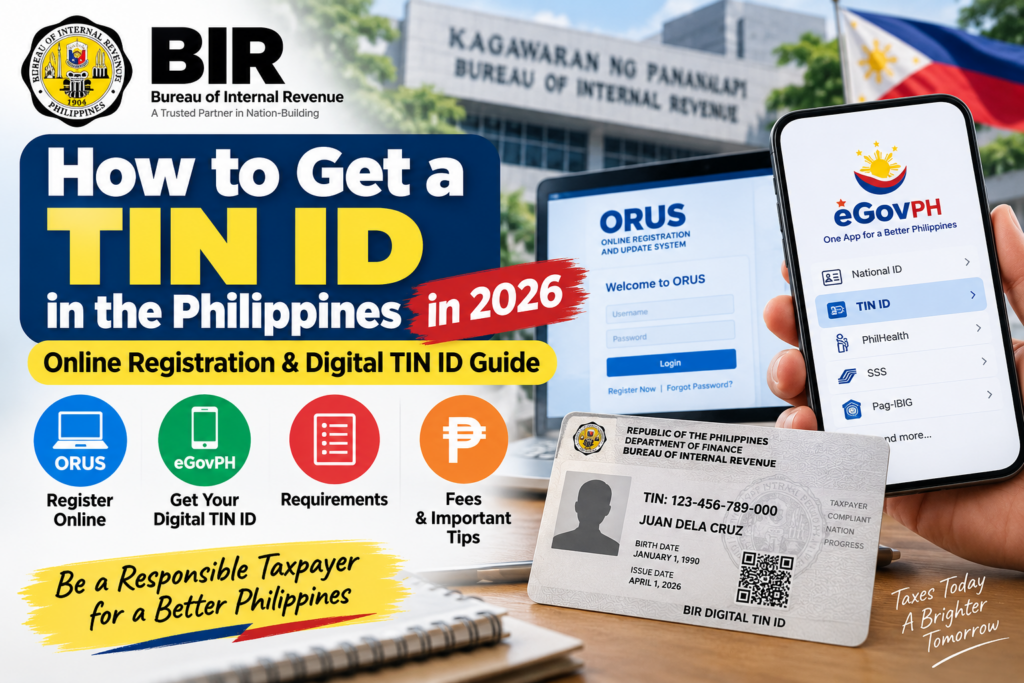
Ngayong 2026, may piling BIR registration at taxpayer services na available online sa Online Registration and Update System (ORUS), depende sa taxpayer type at transaction. Available na rin ang BIR Digital TIN ID sa eGovPH App.
Pero bago ka mag-register, may isang napakahalagang rule:
Kung mayroon ka nang TIN, huwag kumuha ng panibago.
Alamin natin kung paano gawin nang tama.
Ano ang TIN?
TIN stands for Taxpayer Identification Number.
Ito ang identification number na ginagamit ng BIR para sa taxpayer records at applicable tax-related transactions.
Maaaring kailanganin ang TIN para sa employment, business registration, dealings with certain government agencies, banking-related requirements, at iba pang transactions kung saan kailangan ang taxpayer identification.
Pero tandaan:
TIN ≠ TIN ID.
Puwede kang magkaroon ng existing TIN kahit wala kang physical paper TIN card.
At kung mayroon ka nang TIN, ang kailangan mo ay gamitin o i-verify ang existing number—hindi kumuha ng bago.
Ano naman ang Digital TIN ID?
Ang Digital TIN ID ay digital identification credential na inilunsad ng BIR at maaaring ma-access ng qualified individual taxpayers through its online systems.
Available ang Digital TIN ID through ORUS, at noong April 2026, inanunsyo rin ng BIR ang availability nito sa DICT eGovPH Mobile App.
Ayon sa BIR, parehong kinikilala bilang valid government-issued identification ang Digital TIN ID generated through ORUS at ang Digital TIN ID accessed through the eGovPH Mobile ID Wallet, subject to applicable authentication and verification procedures.
Sino ang maaaring kumuha ng TIN online?
Depende ito sa purpose at taxpayer classification.
Sa ORUS, kabilang sa available primary-registration services ang TIN issuance para sa ilang taxpayer categories, kabilang ang applications under Executive Order No. 98, certain one-time transaction taxpayers at foreign individuals. May employer-account functionality din para sa TIN issuance ng employees.
Para sa E.O. 98, kabilang sa mga purpose na tinukoy ng BIR ang:
- Dealings with banks
- Dealings with government agencies
- First-time job seeker
Ang E.O. 98 application para sa qualified individuals ay maaaring simulan online sa ORUS.
Kaya mahalagang piliin ang tamang registration type. Ang E.O. 98 route ay para lamang sa qualified purposes and applicants; hindi nito pinapalitan ang tamang employee, self-employed o business-registration process.
First job mo ba?
Kung first-time job seeker ka, huwag agad isipin na kailangan mong pumunta sa BIR branch at pumila para lang simulan ang process.
Kasama ang First Time Job Seeker sa purposes na nakalista ng BIR para sa applicable E.O. 98 TIN registration process through ORUS.
Gayunpaman, kung hired employee ka na, maaaring may employer-assisted registration process na applicable sa iyong situation.
Kaya bago gumawa ng duplicate application, magandang tanungin muna ang HR:
“May existing TIN registration process ba ang company para sa new employees?”
Makakaiwas ito sa unnecessary o duplicate registration.
How to Get a TIN Online Through BIR ORUS
Kung wala ka pang existing TIN at eligible ang iyong registration category para sa online process, narito ang general flow.
Step 1: Go to the official BIR website or ORUS
Start from the official Bureau of Internal Revenue website.
Mula roon, access the Online Registration and Update System (ORUS).
Ang official ORUS address ay:
BIR Online Registration and Update System (ORUS)
Ayon sa BIR instructions para sa E.O. 98 applicants, maaari ring buksan ang ORUS icon mula sa official BIR website.
Important: Dahil personal at tax information ang ilalagay mo, huwag basta gumamit ng link mula sa random Facebook post, text message o unofficial website.
Step 2: Select New Registration
Sa ORUS, piliin ang:
New Registration
Pagkatapos, piliin ang registration type na tumutugma sa iyong actual situation.
Halimbawa, kung ang purpose mo ay applicable E.O. 98 registration, sundin ang corresponding option.
Huwag pumili ng category dahil lang mukhang pinakamadali.
Ang tamang taxpayer classification ay mahalaga sa iyong BIR record.
Step 3: Create your ORUS account
Kung kailangan ng account para sa transaction, gamitin ang iyong active email address.
Ayon sa BIR’s ORUS instructions, ang taxpayer na wala pang existing TIN o BIR record ay maaaring gumawa ng ORUS account gamit ang permanent email o company email, at isang email lamang bawat taxpayer ang maaaring i-enroll sa ORUS.
Kaya gumamit ng email na:
- ikaw mismo ang may access
- regular mong chine-check
- hindi mo agad mawawala kapag nagpalit ka ng device
Kung may existing TIN ka na, kailangang tugma rin ang email/account setup sa BIR registration requirements.
Step 4: Enter your personal information carefully
Ilagay ang hinihinging personal information.
Maaaring kabilang dito ang:
- Full name
- Birth date
- Address
- Citizenship
- Contact information
- Purpose of TIN application
- Other taxpayer information required by the selected registration type
Ito ang part na hindi dapat minamadali.
Siguraduhing consistent ang information sa government-issued ID na gagamitin mo.
Step 5: Prepare the required identification document
Para sa applicable E.O. 98/ONETT online application, ang BIR Citizen’s Charter lists a government-issued ID showing the applicant’s name, address and birth date.
Examples include:
- PhilID/ePhilID
- Passport
- Driver’s License/eDriver’s License
Kung walang address ang ID, maaaring kailanganin ang proof of residence or business address.
Para sa applicable online process, hinihingi rin ang scanned copy ng ID at selfie photo habang hawak ang parehong ID.
Dapat:
readable, untampered at consistent sa application ang document.
Step 6: Submit the application
Review everything before submitting.
Particularly check:
Name
Birthday
Address
Purpose of registration
Maling taxpayer information ay maaaring magdulot ng additional correction process later.
Kaya mas magandang mag-review nang dalawang beses bago mag-submit.
Step 7: Follow the ORUS confirmation and BIR instructions
Pagkatapos ng submission, sundin ang instructions at notifications na ibibigay ng ORUS/BIR.
Ang exact processing flow ay maaaring mag-iba depende sa taxpayer classification at transaction.
Huwag ipagpalagay na pareho ang procedure para sa:
employee, first-time job seeker, self-employed individual, business owner, OFW, foreign national at one-time transaction taxpayer.
May TIN ka na? Huwag kumuha ulit
Ito ang pinakamahalagang reminder sa article na ito.
Kung dati ka nang nagkaroon ng TIN dahil sa previous employment, business, government transaction o ibang reason:
do not apply for another TIN.
Sa halip, gamitin ang BIR’s available verification/inquiry services or contact BIR if necessary.
Kasama na sa ORUS functionality ang TIN Inquiry.
Kung hindi mo maalala ang iyong TIN, ang tamang solution ay hanapin o i-verify ang existing taxpayer record—not create another one.
How to Get a Digital TIN ID Through ORUS
Kung mayroon ka nang valid TIN at eligible ORUS account, maaari mong gamitin ang ORUS para ma-access ang Digital TIN ID.
BIR officially added Access to Digital TIN ID to ORUS functionality.
Before You Start: Registered Email and Photo
For the ORUS route, BIR RMC No. 120-2023 requires ORUS enrollment and an updated registered email address. Kung luma o mali ang email sa BIR record mo, ayusin muna ito sa RDO kung saan ka registered. The circular provides for submitting Form S1905 — Registration Update Sheet by email to the concerned RDO or through the BIR Taxpayer Registration Related Application (TRRA) portal. Confirm the current official submission channel with your RDO.
Maghanda rin ng 1×1 ID photo, white background, walang border, taken within the last 6 months. Dapat ikaw ang nasa larawan at current ang appearance; sundin ang complete photo rules sa circular at ORUS upload screen.
Kung hindi mag-match ang account at existing taxpayer record, ipa-check ang registered details sa BIR. Huwag gumawa ng bagong TIN para lamang malutas ang account problem.
ORUS registered-email and photo preparation guidance checked: October 25, 2026.
Sa general process:
- Access ORUS.
- Log in to your taxpayer account.
- Make sure your registration information is properly linked and updated.
- Access the Digital TIN ID feature.
- Follow the system instructions to generate or view your Digital TIN ID.
Ang Digital TIN ID process sa ORUS ay free of charge according to BIR’s current registration-information update checklist.
New in 2026: Digital TIN ID through eGovPH
Ito ang malaking update ngayong 2026.
Ayon sa BIR Revenue Memorandum Circular No. 34-2026, naging available ang BIR Digital TIN ID sa DICT eGovPH Mobile App starting April 24, 2026.
Individual taxpayers can access and view their BIR Digital TIN ID through the eGovPH App.
Available ang eGovPH mobile application sa Android at iOS platforms.
Bakit useful ito?
Instead of depending only on ORUS access, qualified taxpayers can keep their Digital TIN ID within the eGovPH Mobile ID Wallet.
Pero may importanteng distinction sa verification.
ORUS-generated Digital TIN ID: maaaring ma-verify online by scanning its QR code.
eGovPH Digital TIN ID: verification requires actual presentation within the eGovPH App while the application is actively being used.
Kaya hindi magandang umasa lamang sa screenshot ng eGovPH Digital TIN ID.
Kung kailangan itong ipakita for verification, buksan mismo ang eGovPH App.
Valid ID ba ang Digital TIN ID?
According to BIR’s 2026 guidance, both:
ORUS-generated Digital TIN ID
and
BIR Digital TIN ID accessed through eGovPH Mobile ID Wallet
are recognized as valid government-issued identification, subject to applicable authentication and verification procedures.
However, tandaan na ang institution na humihingi ng identification ay maaaring magkaroon ng sarili nitong verification procedures o additional requirements.
Paano naman ang physical paper TIN card?
Available pa rin ang paper TIN card process.
Ayon sa current BIR documentary checklist, kabilang sa requirements para sa paper TIN card issuance ang:
- BIR Form No. 1905
- Latest 1×1 photo
- Government-issued ID
- Additional applicable documents
Personal appearance is mandatory for the paper TIN card issuance process described by BIR.
Magkano ang first TIN card?
Ang first-time application for a paper TIN card is free of charge.
Para naman sa replacement dahil lost or damaged, BIR’s current checklist states a ₱100 replacement fee.
Ito ang dahilan kung bakit dapat mag-ingat sa mga nag-aalok online ng “original TIN ID” kapalit ng malaking processing fee.
Digital TIN ID vs Paper TIN Card
| Feature | Digital TIN ID | Paper TIN Card |
|---|---|---|
| Format | Digital | Physical card |
| Access | ORUS / eGovPH | Applicable BIR office process |
| First issuance | Free | Free |
| Personal appearance | Generally digital access | Mandatory for paper-card issuance |
| Verification | Depends on source | Physical presentation |
| Easy to carry | Yes | Yes |
| Can be lost physically | No physical card | Yes |
Pero kung may specific institution na humihingi ng physical documentation, i-check muna kung ano talaga ang accepted requirement nila.
Kailangan ko bang kumuha ng paper card kung may Digital TIN ID na ako?
Hindi dapat isipin na automatic na kailangan mong magkaroon ng parehong version para lang maging valid ang iyong TIN.
Ang pinakaimportanteng bagay ay ang valid taxpayer record at TIN.
At ayon sa BIR, recognized government-issued identification ang Digital TIN ID subject to verification.
Kung kailangan mo ng ID para sa isang particular transaction, itanong muna sa requesting institution kung anong form ang tinatanggap nila.
First-Time Job Seeker: Ano ang dapat tandaan?
Kung first job mo ito, madaling malito dahil sabay-sabay hinihingi ang:
SSS
PhilHealth
Pag-IBIG
TIN
NBI Clearance
at iba pang employment requirements.
Para sa TIN, tandaan ang dalawang tanong:
May TIN na ba ako dati?
Kung yes, gamitin ang existing record.
Wala talaga akong TIN?
Then follow the appropriate BIR/employer registration process based on your actual situation.
Kasama ang First Time Job Seeker sa purposes identified by BIR for applicable E.O. 98 registration.
Self-employed o business owner ka?
Kung magnenegosyo ka o magiging self-employed taxpayer, huwag gamitin ang simpleng E.O. 98 registration guide bilang substitute sa business-taxpayer registration.
May sariling primary registration requirements ang BIR para sa business taxpayers.
Ang ORUS itself supports several business registration functions, kabilang ang electronic Certificate of Registration at applicable secondary registration services.
Kung negosyo ang purpose mo, sundin ang business registration requirements applicable sa iyong situation.
Para maintindihan ang tax brackets at deductions na maaaring applicable sa kita mo, basahin din ang BIR Income Tax Philippines 2026 guide.
Common mistakes na dapat iwasan
1. Applying for another TIN
Ito ang pinakamalaking mistake.
Kung may existing TIN ka, recover or verify it instead.
2. Paying someone for a “fast TIN ID”
Be careful with unofficial sellers or fixers.
Official online Digital TIN ID access is available through BIR systems, at first-time paper-card issuance is free under current BIR rules.
3. Using an unofficial website
For ORUS, start from the official BIR website or orus.bir.gov.ph.
4. Choosing the wrong registration category
First-time employee, E.O. 98 applicant, self-employed taxpayer at business owner are not automatically the same category.
5. Uploading unreadable documents
Make sure scanned IDs and photos are clear and consistent with your application.
6. Using someone else’s email
Your tax records are sensitive.
Use an email account that you personally control.
7. Treating a screenshot as the Digital TIN ID
Especially for the eGovPH version, BIR says verification is through actual presentation within the active eGovPH application.
Frequently Asked Questions
Can I get a TIN online in the Philippines?
Yes, BIR’s ORUS provides online TIN registration for applicable taxpayer categories. The exact procedure depends on why you need the TIN and your taxpayer classification.
Can I get a TIN ID online?
Eligible individual taxpayers can access a Digital TIN ID through ORUS. As of April 24, 2026, BIR Digital TIN ID is also available through the eGovPH Mobile App.
Is the Digital TIN ID valid?
Yes. BIR states that Digital TIN IDs generated through ORUS and accessed through the eGovPH Mobile ID Wallet are recognized as valid government-issued identification, subject to applicable verification procedures.
Is the Digital TIN ID free?
BIR’s current documentary checklist lists securing a Digital TIN ID through ORUS as free of charge.
Is the first paper TIN card free?
Yes. The current BIR checklist states that the first-time paper TIN card application is free. Replacement due to loss or damage costs ₱100 under the current rules.
Can I have two TINs?
Do not apply for another TIN simply because you forgot your previous number or changed jobs. Verify your existing BIR record instead.
Can I use eGovPH for my Digital TIN ID?
Yes. This became available starting April 24, 2026 for individual taxpayers under BIR’s 2026 guidance.
Final Reminder
Getting a TIN or TIN ID in the Philippines is becoming easier because more BIR services are now digital.
But the most important thing is not simply getting an ID card.
It is making sure that your taxpayer record is accurate and that you do not create a duplicate TIN.
If you’re applying for the first time, identify the correct registration category before submitting anything.
If you already have a TIN, use your existing record.
And if you only need identification, check whether the Digital TIN ID through ORUS or eGovPH already meets your needs before going through the paper-card process.
Information checked: September 15, 2026.
PINOY GUIDE is an independent informational website and is not affiliated with, endorsed by, or operated by the Bureau of Internal Revenue or any Philippine government agency. BIR registration procedures and requirements may change. Always verify important information through official BIR channels before submitting personal information or completing a transaction.
Official Sources
Bureau of Internal Revenue — Online Registration and Update System (ORUS).
Bureau of Internal Revenue — RMC No. 34-2026: Digital TIN ID through the eGovPH Mobile App.
Bureau of Internal Revenue — Citizen’s Charter: Online TIN Application through ORUS.
Bureau of Internal Revenue — ORUS E.O. 98 Registration Guide.
Bureau of Internal Revenue — 2025 Checklist of Documentary Requirements, Digital and Paper TIN ID.





Comments 0
Be the first to comment..